Tips to Make Better Videos on Your Phone
Making videos on your phone? Contact Mike for advice and an editing service to help you make better videos for your business.
Tips to Make Better Videos on Your Phone
Do you make your own business videos on your phone? Or perhaps you are thinking about it but not sure how to go about it. Here are a few points to consider:
- Video is the best way to tell the story of your business online
- History tells us that brands which continue marketing activity through the bad times are the ones that recover fastest when things start improving
- Shooting your own video on is easier and more accessible than it has ever been
So if you’re not doing it yet, it’s time to start making videos for your business. Now, in the time of Covid 19 it’s more important than ever. So no excuses please. Your past, present and future customers have time to spare. They are spending more time on social media and video is the most popular type of content.
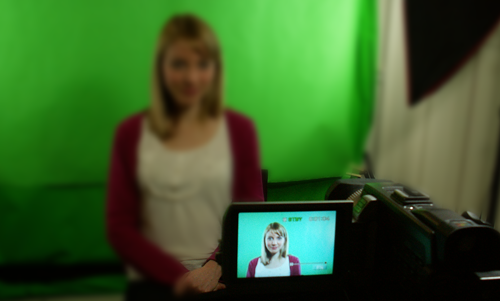
Whether you’re using a smart phone, video camera or DSLR, here are some tips to help you avoid the pitfalls and make better videos.
Basic video tips
If you’re shooting a video on your phone, hold it so you frame your picture Landscape. Think about the shape of your computer screen, your TV, the YouTube frame. Holding your phone vertically means you will just get a strip down the middle of the picture area, sometimes called the pillar box effect, so your picture will be small with blank space each side.
So remember to think wide, landscape, horizontal.
Next think about the light in your video. For example if you stand in front of a window in the daytime your camera will automatically adjust for the bright sunlight outside, leaving your face in the dark. Side-on to the window might be ok. If it gives you dramatic shadows you might try using a lamp or a reflector on the other side to even things out. And it doesn’t have to be anything fancy, a piece of white cardboard will do fine. You just need to prop it up or get a friend to hold it. Experiment with what you’ve got.
Yes it’s video, but can you hear it?
Think about Sound! Many video professionals will tell you that sound is the most important part of a video. Sound quality makes a huge difference to how good or bad people think your video is. Top tips for video sound include:
- Background noise – try to shoot somewhere quiet without traffic, power tools, noisy neighbours
- Echo – beware of an empty room with little furniture and no carpet. It’s pretty much impossible to get rid of an echo from your recording
- Handling noise – if you’re holding your phone or camera, the built-in microphone will pick up every movement of your fingers so try to use a tripod or rest your camera on something, or just keep your hands really still
- Use an external microphone if possible. Search online for something compatible with your device. There are lots of microphones available in a whole range of prices. A basic lapel microphone (sometimes called a lavalier) will help you avoid most of the problems listed above.
Improve your video quality
Here are some ideas to make your phone videos even better
- Use a tripod or some other camera support. It doesn’t have to be expensive. It could even be that you rest your camera on something solid. Nobody will notice a nice steady shot, but a wobbly video is annoying to watch and will distract people from the message.
- Try not to use the digital zoom. You will get much better picture quality from using the ordinary, un-zoomed video. If your subject is too small, try to get closer. Or you could buy extra lenses to help you get the picture you need.
- Definitely don’t try to zoom in or out during a shot. Just don’t.
- Focus. Many phones allow you to focus just by tapping the screen on the area you want to be in focus. If you want more control you could download a camera app that controls this function manually.
- Clean the lens. Remember that your phone has been in your pocket, in your hands, and goodness knows where else. Remember to give the lens a quick wipe before you start videoing.
Personal Presentation
- Think about what you’re going to say. Nobody wants to hear you say “Um, er.” If it’s too long to remember then download a teleprompter app.
- If your video is a virtual tour, a selfie or a physical demonstration of something remember to look at the camera when you’re talking or half your words will be lost
- If you’re talking to the camera on a phone or tablet remember to look at the actual camera lens, not your picture on the screen, otherwise your eyes will be looking off to one side instead of seeming to look straight at the audience.
Edit Your Video
It’s a wrap! Now edit your video. This is the bit that many people find scary, but it will make a huge difference so don’t skip it. At the very least you might want to trim off the start and end of your clip. You know, the bit when you’re reaching for the on/off button, and the moment when you groan or explode with laughter at the end of a shot. Your video is representing your business and proper editing will make it look so much more professional. There are apps you can download to edit on your phone or tablet. Or you can download your video clips to your computer and edit them there.
If all that sounds too difficult, you can send them to me. During the lockdown I have been editing self-shot videos for business owners. Some of them are on this page. I can process sound and video to enhance your efforts and add titles, logos and music. It’s an economical way to achieve professional looking video results.
Contact me now to discuss.
And Finally…
Be safe. Think about safety. Once you get started you’ll find that making videos can be fun and very absorbing. It’s all too easy to focus on the video picture and forget about what’s around you. Keep a look out for hazards, or If necessary have a friend watching out for you.